
You’re the Entire IT Department: PHP2Shell Vulnerability

CVE-2026-109618 and CVE-2026-109619
Oh, look at you. Look at the little IT guy. Put the tissues down, what are you doing? Are you crying into a lukewarm mug of Folgers because the internet posted a big scary number with a decimal point?
"Oh no, it’s a 9.8! It’s PHP2Shell! The multipart form data is corrupting the heap pointers! We’re all gonna die!"
Shut up. Get your shit together. Put it all in a backpack, all your shit, so it's all in there together. Get your shit together.
Look at me. It’s PHP, alright? PHP has been duct-taped to the underbelly of civilization since your parents were listening to Smash Mouth unironically. The entire global economy runs on servers held together by spit, prayer, and an unmaintained WordPress box someone set up during the Obama administration. This isn't the apocalypse, it’s just Tuesday.
Here’s your problem: you don't even know if you’re actually on fire. You’re sitting here weeping like you just got dumped at a Green Day concert because you just weren't "punk enough", but you haven't even checked if your servers are configured to trigger the damn thing. A vulnerability without an attack path is just spicy math. It doesn’t mean jack shit until somebody can actually touch it.
So wipe your face, stop hyperventilating, and open a terminal. We’re gonna fix this in three steps, and none of them involve you curled in the fetal position under a folding desk... well unless that breakfast burrito was undercooked again... :
Find the bodies: We’re gonna sweep your garbage network and figure out which forgotten, cobweb-covered VM is actually running this garbage.
Break it on purpose: We’re firing up TryHackMe so you can watch the exploit land in a sandbox, see what the payload actually looks like, and realize it’s not magic—it’s just bad code written by tired mortals.
Band-aid the bleeding: We’re gonna drop a real mitigation in place so you don't have to cowboy-patch a production box on a Tuesday and spend your weekend explaining to Brenda in accounting why her invoice generator won't boot.
Drink your coffee. Open the shell. Let’s do some actual work.
Before you go blindly running "apt-get dist-upgrade" across twenty random hosts like an amateur playing Russian roulette with production, we need an asset check.
You think you know what’s running on your network? You don’t know shit. You've got an ancient Ubuntu 16.04 box sitting under a stack of dead Dell OptiPlexes in the furnace room that nobody has logged into since Harambe was alive. That box is running Apache. It’s running PHP. And it’s probably hosting the only copy of the company's 2017 holiday party photos.
We don't guess. We hunt.
Step 1: The Ghost Hunt (And Why Your First Scan Is a Total Lie)
We have two problems to solve before we touch a damn thing:
What boxes on our network are exposing web services to the subnet—or worse, the public internet?
Which of those are actually executing PHP, and in what godforsaken configuration?
To keep our sanity and avoid setting up twenty separate production fire drills, we’re using a mix of our own internal test box and the TryHackMe | PHP2Shell room for the deep-dive exploitation later.
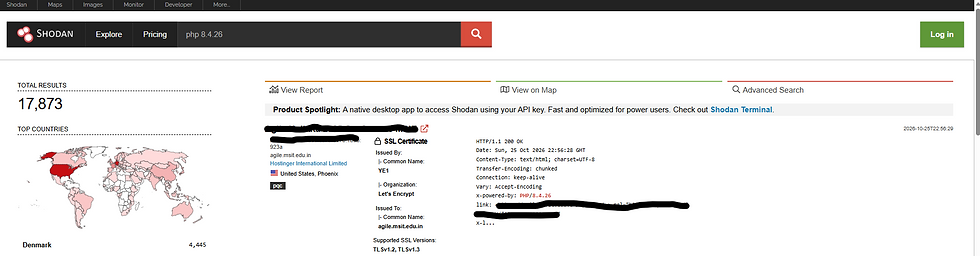
Shodan. Quick and easy - plug all your IP's into Shodan and see what shows up. If they're here... you're probably already fucked.
The Subnet Sweep (Nmap Without the Noise)
Don't go firing off a reckless 65,535-port scan across your entire /24 right now unless you want your network switches to start crying and your firewall logs to choke. Let's at least get us a list of web servers running on known ports.
Hit the usual suspects: standard HTTP, HTTPS, and common dev/admin web ports:
nmap -sV -p 80,443,8080,8443,8888 --script http-headers 192.168.1.0/24 -oG php_discovery.txtWhat are we looking for? Grep that output for obvious web servers:
grep -iE "php|apache|nginx" php_discovery.txt
If we take a minute and look at the scan output on our test target:
PORT     STATE SERVICE VERSION
8080/tcp open  http    Apache httpd 2.4.52 ((Ubuntu))
| http-headers:
|   Server: Apache/2.4.52 (Ubuntu)
Look at that. You see any mention of PHP in there? Nope. Not a whisper. That's because we're not actually invoking PHP here.
So you decide to test a specific endpoint with a quick HEAD request:
And the server spits back:
HTTP/1.1 200 OK
Server: Apache/2.4.52 (Ubuntu)
Content-Type: text/html; charset=UTF-8
Still nothing! No X-Powered-By: PHP/... header. If you’re a lazy admin checking off boxes on a compliance sheet, you’d pack up your tools right here and tell management: "All clear! It’s just Apache serving plain HTML, boss!"
And you’d be dead wrong.
Why Your Remote Scan Just Lied to You
You just got hit by the two biggest blind spots in surface-level vulnerability scanning:
The Root Document Trap: When Nmap hits a web server, it sends a probe to "/". On a default Ubuntu/Debian Apache setup, the root document is static: "/var/www/html/index.html". Apache just flings static HTML off the hard drive. It never invokes the PHP engine, so PHP never gets the chance to slap its name on the headers.
The expose_php = Off Reality: Most modern Linux packages ship with expose_php disabled by default, or the web server strips the header entirely. Relying on an HTTP header to tell you if PHP is running is like expecting an intruder to wear a nametag.
Forcing PHP to Blow Its Cover
If you want remote proof that an application is actually invoking PHP, you have to look at the response body, not just the headers:
curl -s http://192.168.1.50:8080/info.php | grep -i "php version"Boom. Right in the raw HTML markup: PHP Version 8.1.2 -assuming you can get to that page that is... god... can YOU?! You've now got bigger problems...
The web server was hiding it from the headers, but the Zend engine was loaded, running in memory, and executing code the entire time.
2. The Local Box Audit (Don't Trust Banners at All)
If you have SSH or administrative access to the box, stop poking at it from across the network like a tourist. Log into the server directly and interrogate the OS:
# Check running processes for PHP or web daemons
ps aux | grep -E 'php|apache2|httpd|nginx'

# Check active listening ports and who owns them
ss -tulpn | grep -E '80|443|9000'
If you see php-fpm running on a local port/socket, or Apache actively running with child workers, you have an active environment.
I would say that the only real way is to check what version is actually installed on the system:
php -vIf it spits back a vulnerable branch, do not touch it yet. Take a breath, write down the hostname, and document the version. We don't cowboy-patch while we're still mapping the minefield.
3. The Wildcard: Rogue Containers
This is where small IT environments usually get blindsided.
"Oh, we don't install PHP on our bare-metal servers!"
Yeah, sure. But six months ago, someone in marketing or a junior tech spun up a Docker container on an internal utility box to run an open-source ticketing system or an inventory wiki.
Check for containers publishing web ports:
docker ps --format "table {{.ID}}\t{{.Image}}\t{{.Names}}\t{{.Ports}}"
If there's an image exposing ports 80, 443, or 8080, poke inside it directly:
docker exec -it <container_name> php -v
Containers aren't magical security shields. If the container is running a vulnerable PHP runtime, an attacker who pops that web process is inside your container—and if your volume mounts or permissions are sloppy, they're one step away from your host.
Now you’re not guessing. You’re not relying on a half-assed Nmap scan that got fooled by a default index page. You have a definitive list of IPs, hostnames, whether they're bare-metal or containerized, and exactly what PHP versions are loaded in memory.
You hold the map.
There has to be an Automated way...
"W-w-what?! You mean I have to *touch* computers? Can’t I just click the big red 'Fix Everything' button and go back to scrolling TikTok?!"
Of course there’s a faster way. I just made you do it manually first so your tiny, checklist-addicted brain would understand *why* you were doing it instead of blindly copying a script from a guy with a furry avatar on GitHub.
If you have two servers, checking them manually takes ninety seconds. But if you're staring at fifty hosts across three VLANs and you try to curl them one by one like a caveman banging rocks together, you’re gonna be here until next Thanksgiving.
You want automation? Fine. Stop weeping and let the shell do the heavy lifting.
The "I Have a Life Outside This Basement" Automation Pipeline
We’re not buying a $40,000 enterprise vulnerability scanner that sends seventeen useless PDFs to your boss. We have Bash, we have Nmap, and we have "xargs".
Here is the three-step pipeline to find the listeners, probe the endpoints, and spit out a clean spreadsheet while you sit back and drink your coffee:
1. The Fast Harvest (Nmap Grepable Output)
First, we tell Nmap to sweep the web ports across the entire subnet and dump **only** the live IP:port combos straight into a clean text file:
nmap -p 80,443,8080 -sT --open -n 192.168.1.0/24 -oG - | awk '/open/{print $2 ":" $5}' | sed 's/\/.*//' > web_targets.txtI pasted it but nothing happened... What did that do? It hit the wire, found every open web port, stripped out all the useless Nmap boilerplate, and gave you a dead-simple list of "IP:Port" pairs in "web_targets.txt". Clean. Zero fluff.
2. The Endpoint Probe Loop
Remember what we just learned? Probing "/" is for suckers. We want to test common PHP landing spots ("info.php", "test.php", "index.php", "login.php") without sitting there typing like a court reporter.
Feed that list right into a bash one-liner with a strict timeout so dead hosts don't stall your pipeline:
while read target; do
  for path in "info.php" "index.php" "test.php"; do
    res=$(curl -s -m 2 -L "http://${target}/${path}")
    ver=$(echo "$res" | grep -ioE 'PHP Version [0-9]+\.[0-9]+\.[0-9]+' | head -n 1)
    if [ ! -z "$ver" ]; then
      echo "[VULN/FOUND] http://${target}/${path} -> ${ver}"
    fi
  done
done < web_targets.txt | tee audit_results.log
You run that. It loops through your targets, silently probes the paths, pulls the version straight out of the HTML body with regex, and writes every confirmed instance to "audit_results.log".

3. What If You Have Central Management? (The Cheat Codes)
If you're sitting on a domain or you run config management, why the hell are you even scanning the wire?
Linux fleet with Ansible? One ad-hoc command:
ansible all -m shell -a "php -v" --ignore-errorsWindows/IIS fleet with PowerShell? One sweep through Active Directory:
Invoke-Command -ComputerName (Get-ADComputer -Filter *).Name -ScriptBlock { Get-Command php -ErrorAction SilentlyContinue | Select-Object Source }BTW, these were pulled by Gemni... I haven't actually tested them.... so you know the drill, you run 'em I take no responsibility.
There. Automated. It takes twelve seconds to run, tests the actual execution context, and you don’t have to develop carpal tunnel hitting `curl` sixty times.
Now do you want to keep complaining about doing your job, or are you ready to fire up TryHackMe and watch this heap exploit actually blow up in the sandbox?
Step 2: Hack the Gibson
Alright, junior. You’ve scanned the wire, found where PHP is squatting, and you have a list of targets. Now comes the part where most people lose their minds: Understanding the exploit without turning into a script-kiddie.
Here’s the deal: you can’t defend what you don’t understand. If you just read CVE descriptions, you get word-salad like "multipart form-data parsing error leading to heap memory corruption." Cool story, bro. What does that actually mean when an HTTP packet hits your box?
Let’s tear it apart in the safety of TryHackMe so you don’t accidentally incinerate your actual servers. TryHackMe | PHP2Shell
Before we look at what happens in the lab, let's understand why this vulnerability (and runtime memory bugs in general) makes people wet their pants.
1. The Anatomy of a Runtime Flaw (Why Code Audits Won't Save You)
Normally, when you think of web vulnerabilities—SQL injection, cross-site scripting, bad authentication—it's because some developer had a brain cramp and wrote garbage application code.
PHP2Shell isn't an application bug. It's a C-level runtime bug.
Your web page could literally be:
<?php
echo "Hello World";
?>
That's it. Perfect code. Zero user input processed. No databases. No forms. And it can still be vulnerable.
Why? Because the flaw lives inside how PHP’s Zend Engine parses incoming HTTP requests before your script even gets executed.
2. What the Attack Actually Does (In Plain English)
Here is the simplified mechanic of how the exploit unfolds, there's a great writeup inside the THM PHP2Shell lesson that does a better job then I can:
The Setup (Multipart POST): When a client uploads a file via a multipart POST request, PHP has to track and buffer the chunks of data.
The Crash/Bailout: No not another government bailout - an attacker sends a specially malformed request (or triggers an out-of-memory condition during parsing). The Zend engine encounters a fatal parse error and triggers a "bailout"—basically, an emergency exit from the current request processing loop.
The Dangling Pointer (Use-After-Free): During that emergency bailout, PHP's internal cleanup routines fail to properly free or null-out certain memory pointers on the heap. A pointer is left pointing to memory that has already been deallocated or marked for reuse.
The Hijack: In a persistent worker model (like "php-fpm" or persistent Apache child processes), the worker process doesn't die; it hangs around to serve the next request. The attacker immediately sends follow-up requests to spray the memory space, fill that dangling pointer's address with arbitrary pointers, and hijack execution flow into libc functions (like "system()").
3. What You See in the Lab
The lab will have a single python script that you'll be running with a "-c" switch allowing us to send commands to that "system()" function.

When the attack pops, look at who you are:
PROOF: uid=33(www-data) gid=33(www-data) groups=33(www-data)Notice the user context? It didn't pop "root". It popped the web daemon account ("www-data"). The attacker isn't God yet. If your file permissions are locked down and that user can't write to web roots or sudo anything, the blast radius is contained. If your permissions are 777 everywhere because "it was the only way the app worked," you're completely screwed.
Right now we've:
Survived the Hook: Stopped crying into your lukewarm coffee.
The Ghost Hunt: Learned why Nmap lied to your face and how to actually sweep the subnet to find where PHP is squatting.
The Sandbox: Looked at the mechanics of a heap-level runtime flaw, saw the "www-data" context, and gathered the crash artifacts.
Step 3: The Triage & Mitigation (Fixing It Without Breaking Production).
This is where the real sysadmin work happens. You can't just slap a raw "apt-get upgrade" on a box in the middle of a workday if you don't know what legacy Frankenstein monster is depending on it.
The Defender’s Playbook (Patch, Pray, or Block)
When a 9.8 hits, junior techs hit the update button and pray. Senior admins look for surgical mitigations so they can buy time, run regression tests, and patch during an actual maintenance window.
1. The Reality of Patching (Package Maintainers vs. Compiling)
The Trap: Never compile PHP from source on a production box just to get the newest patch 15 minutes faster unless you want unmanaged binaries haunting your soul for five years.
The Move: Check your upstream vendor/distro security tracker (Debian security advisories, Ubuntu USN, Red Hat Errata). Distros backport fixes to the distro's package version without bumping the major/minor releases, which means your code doesn't randomly break.
2. The Stopgap Mitigations (Before the Patch)
What if an upstream patch isn't out yet, or you need 48 hours to test your business app? You shut off the attack surface. This is what we saw a lot of people doing to protect their assets.
Disable the specific trigger in "php.ini":
For memory/bailout or file-upload quirks, disabling vulnerable modules or tweaking upload settings stops the parser from even hitting the bad code path:
Example: Turn off file uploads if the internal tool doesn't even need them
file_uploads = OffTHM suggests setting:
session.upload_progress.enabled = 0WAF / Reverse Proxy Rules (Nginx / Apache mod_rewrite):
If the flaw relies on specific argument passing or malformed multipart boundaries, drop them at the door. You don't let bad traffic touch the PHP backend at all:
RewriteEngine On
RewriteCond %{QUERY_STRING} (%2d|-)[a-zA-Z] [NC]
RewriteRule .* - [F,L]
3. Hardening the Blast Radius
If someone does manage to pop a shell despite everything, make sure they land in a padded cell:
No Sudo for Web Users: Double-check "/etc/sudoers" or "/etc/sudoers.d/". Make damn sure "www-data" has zero sudo rights.
Read-Only Roots: Web directories should not be writable by the web daemon unless explicitly required for an "uploads/" folder (and in that folder, disable execution entirely via ".htaccess" or server config: "php_admin_flag engine off").
4. Detection: Grepping the Crime Scene
What do you look for right now to see if someone already tried it? Check access logs for massive POST spikes or anomalous queries. The below will capture all posts requests and group them together with a count - you can see 42 attempts to breach info.php:
grep -E "POST " /var/log/apache2/access.log | awk '{print $1, $7, $9}' | sort | uniq -c | sort -nr | head -n 20

Check for repeated worker segfaults in `syslog` or `dmesg`:
dmesg -T | grep -i "segfault"Step 5: The Outro & The Automation Habit (Stop Doing Fire Drills by Hand).
You survived the morning. Your pulse is back down below "cardiac arrest" levels, nobody got fired, and you didn't blow up production before lunch. But if you walk away right now and don't change how you handle this crap going forward, you’re just begging for the exact same panic attack the next time a three-letter agency drops a bulletin.
Look at what we just went through:
We woke up to panic headlines.
We found out our default network scans were lying to us because static HTML pages were shielding loaded PHP engines.
We checked the local hosts, confirmed what was actually executing, and dug into the crash artifacts so we knew what an attack footprint looked like.
We locked down the attack surface with config tweaks and upstream distro patches instead of reckless source compiles.
If doing that across your infrastructure took you half your workday, that’s your wake-up call. You’re a solo admin—or part of a lean shop—which means your time is the only asset that actually matters. You can’t afford to spend four hours playing detective every single time an infosec influencer drops a tweet with skull emojis.
Build the Trap Once, Sleep Forever
You don't need a six-figure enterprise SIEM to keep from getting blindsided (although trust me a good SIEM is a god send). Take an hour on Friday afternoon and set up two dumb-simple automations:
Daily CISA / NVD Threat Feeds into Slack or Discord:We did a project that was close to this here: https://www.aldern00b.com/post/how-i-automated-my-daily-cve-intel-pipeline-for-0-and-saved-my-management-from-terminal-brain-rot Hook up an n8n workflow or a 10-line Python script that monitors the CISA Known Exploited Vulnerabilities (KEV) catalog or an RSS feed. Have it dump critical alerts straight into an IT channel so you see them at 7:00 AM—before the rest of the building starts breathing down your neck.
Weekly Internal Web Asset Audit: Take that bash discovery one-liner we built back in Step 2. Wrap it into a cron job. Have it sweep your internal server subnets once a week, probe the endpoints, and email you a diff of any new web listeners or changed PHP version headers.
When marketing spins up a rogue container next Tuesday, you'll know about it before the CVE even has a logo.
Vulnerability management isn’t about being a 24/7 superhero, and it sure as hell isn't about panicking every time a 9.8 hits the news. It’s about being lazy enough to automate the inventory, smart enough not to trust a basic port scan, and calm enough to verify the configuration before you break your own toys.
Put the coffee down. Go take a walk. Your servers will still be here when you get back.


Comments